


Choosing the desktop version of MetaTrader 5 offers distinct advantages for active traders. When you opt for MT5 Windows, you get stability, speed, and a dedicated environment free from browser limitations. This translates into smoother operations, faster execution, and a more focused trading experience. The MetaTrader 5 desktop version ensures you always have the most reliable tool at your fingertips, whether you are managing complex strategies or simply monitoring price action.
The MetaTrader 5 platform brings a suite of advanced tools right to your Windows PC. Discover what makes it an essential asset for your trading journey:
- Advanced Charting Tools: Dive deep into market analysis with over 21 timeframes and 38 technical indicators. Customize your charts to fit your unique analytical style.
- Comprehensive Market Depth: Access real-time market depth data to gain crucial insights into liquidity and price dynamics.
- Flexible Order Management: Utilize a wide array of order types, including pending orders like Buy Stop Limit and Sell Stop Limit, for precise execution.
- Algorithmic Trading: Empower your strategies with Expert Advisors (EAs). Develop, test, and run automated trading systems directly from your platform.
- Extensive Asset Classes: Trade Forex, Stocks, Indices, Commodities, and Cryptocurrencies all from a single, integrated platform.
- Economic Calendar: Stay ahead of market-moving events with an integrated economic calendar, helping you make informed decisions.
Seamlessly Start Your Trading Journey
Getting started with the RoboForex MetaTrader 5 Windows Download is straightforward. We ensure a smooth process so you can focus on what matters most: trading. Simply initiate the download MT5 PC installer directly from our website. The installation guides you through each step, making sure you have MT5 for PC up and running quickly.
Once installed, log in with your RoboForex account credentials and immediately access a world of trading opportunities. Experience responsive performance, rich analytical capabilities, and the full suite of trading tools designed to give you an edge in the markets.
Why Choose RoboForex for Your MetaTrader 5 Experience?
RoboForex enhances your MetaTrader 5 experience with superior execution, competitive trading conditions, and dedicated client support. We understand the demands of modern trading and provide the infrastructure to help you succeed. Partnering with us means you trade with confidence, knowing you have a reliable broker supporting your every move on the advanced MetaTrader 5 platform.
Ready to elevate your trading? Download RoboForex MetaTrader 5 for Windows today and step into a world of advanced financial market access and analytical power.
- Why Choose MetaTrader 5 for RoboForex?
- Key Advantages of MT5 on Windows
- Enhanced Performance and Stability
- Advanced Analytical Toolkit
- Powerful Algorithmic Trading
- Multi-Asset Trading Capabilities
- Unparalleled Customization and User Experience
- Seamless Installation Guide: RoboForex MT5
- Before You Begin: System Requirements
- Step-by-Step: How to Download MT5 PC
- Installing Your MT5 Windows Terminal
- First Launch and Connecting to RoboForex
- System Requirements for MetaTrader 5 Windows
- Minimum Specifications for MT5 Windows
- Recommended Specifications for Optimal Trading
- The Power of a Stable Internet Connection
- Tips for Enhancing MT5 Performance
- How to Log In to Your RoboForex Account on MT5
- Exploring RoboForex MetaTrader 5 Features
- Advanced Charting Tools
- Key Charting Features You Will Love:
- Multiple Timeframes and Indicators
- Algorithmic Trading with Expert Advisors
- Depth of Market (DOM) Functionality
- Trading Instruments Available on RoboForex MT5
- Managing Your Trades Effectively with MT5
- Customizing Your MetaTrader 5 Interface
- Master Your Workspace Layout
- Craft Your Chart Aesthetics and Functionality
- Leverage Profiles for Power Users
- Streamlined Execution with Hotkeys
- Mobile Trading vs. Windows Desktop MT5
- The Appeal of Mobile Trading
- Unleashing Power with Windows Desktop MT5
- Key Differences at a Glance
- When to Choose Which
- Security Measures in RoboForex MetaTrader 5
- Protecting Your Data and Transactions
- RoboForex’s Enhanced Security Framework
- Troubleshooting Common MT5 Download Issues
- Initial Checks Before You Begin
- Addressing Specific Download & Installation Problems
- Antivirus and Firewall Interference
- Corrupted Download File
- Installation Errors (Run as Administrator)
- Outdated Graphics Drivers
- When to Seek Professional Support
- Maximizing Your Trading Potential with RoboForex
- Your Gateway to Advanced Trading: RoboForex and MetaTrader 5
- Get Started: The RoboForex MetaTrader 5 Windows Download
- Why Choose MT5 for PC on RoboForex?
- Seamless Integration, Superior Performance
- RoboForex MetaTrader 5: A Professional Trader’s Choice
- Unleashing Advanced Trading Power
- Key Advantages for Traders:
- Why Choose RoboForex for Your MT5 Experience?
- Seamless Access: Download MT5 PC Today
- Frequently Asked Questions
Why Choose MetaTrader 5 for RoboForex?
Trading in today’s dynamic markets demands a powerful, reliable platform. For RoboForex clients, MetaTrader 5 stands out as the ultimate choice. This advanced platform elevates your trading experience, offering unparalleled analytical tools, diverse asset capabilities, and robust performance right from your computer. Choosing the MetaTrader 5 desktop means equipping yourself with a cutting-edge environment designed for serious traders.
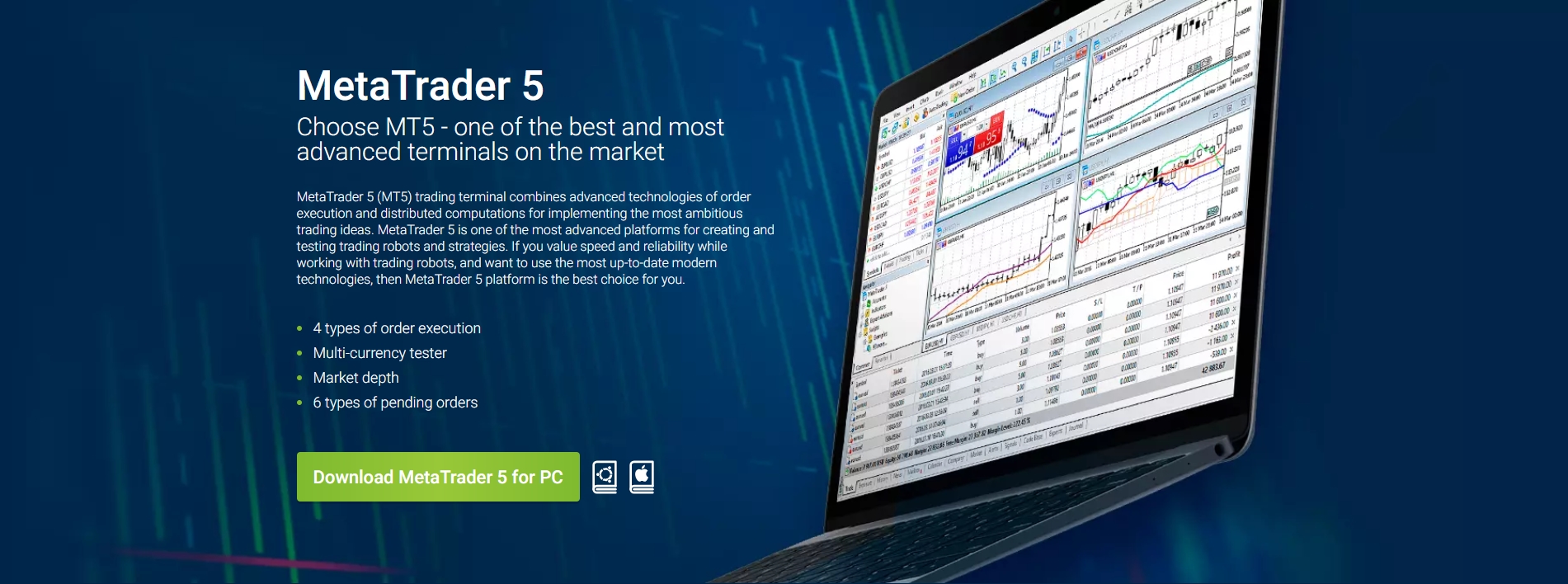
Unleash Advanced Trading Features for Superior Performance
MetaTrader 5 provides a comprehensive suite of features that empower you to make informed decisions and execute trades with precision. Forget limitations; embrace a world of possibilities:
- Superior Charting Tools: Dive deep into market analysis with 21 timeframes, over 80 built-in technical indicators, and analytical objects. Customize your charts to pinpoint trends and predict market movements with greater accuracy.
- Expanded Market Access: Trade not just Forex, but also CFDs on stocks, indices, commodities, and even cryptocurrencies, all from a single, integrated platform. This diversification opportunity is crucial for a well-rounded portfolio.
- Algorithmic Trading & EAs: Automate your strategies with Expert Advisors (EAs) and custom indicators. The MQL5 programming language opens doors to creating sophisticated trading robots, helping you capitalize on opportunities 24/7.
- Depth of Market (DOM): Get a real-time view of market liquidity and demand with the Depth of Market feature. It provides valuable insights into current bid and ask prices, helping you understand market sentiment.
- Financial News & Alerts: Stay updated with integrated financial news feeds and set up custom alerts to never miss a critical market event.
When you download MT5 PC, you gain access to a platform optimized for desktop performance. The native application ensures stability, speed, and responsiveness crucial for quick trade execution, especially during volatile market conditions. This dedicated MT5 Windows application means a smooth, uninterrupted trading journey. It’s truly the best MT5 for PC experience.
RoboForex leverages the full power of MetaTrader 5, providing you with competitive trading conditions, tight spreads, and fast execution across all available instruments. The combination of RoboForex’s robust infrastructure and the advanced features of MetaTrader 5 creates an unbeatable trading ecosystem.
Ready to experience the difference? The RoboForex MetaTrader 5 Windows Download is your gateway to a superior trading world. Get started today and transform your trading potential with a platform built for success.
Here’s a quick overview of key advantages:
| Feature | Your Trading Benefit |
|---|---|
| Multi-Asset Capability | Diversify your portfolio across Forex, stocks, and more from one place. |
| Advanced Analytical Tools | Make data-driven decisions with superior charts and indicators. |
| Automated Trading (EAs) | Utilize Expert Advisors for continuous market monitoring and execution. |
| Optimized PC Performance | Enjoy a fast, stable, and highly responsive trading experience on your computer. |
Key Advantages of MT5 on Windows
Why do savvy traders choose MT5 for PC? The MetaTrader 5 desktop platform on Windows isn’t just an upgrade; it’s a complete transformation of your trading potential. When you execute a RoboForex MetaTrader 5 Windows Download, you gain access to an environment engineered for speed, precision, and unparalleled analytical power. Let’s explore the core benefits that make MT5 Windows the preferred choice for serious market participants.Enhanced Performance and Stability
Your trading success hinges on reliable execution. The MT5 for PC version running natively on Windows delivers superior performance. It ensures rapid order execution and stable operation, even during peak market volatility. You experience minimal latency, which is critical for scalpers and day traders. This robust architecture means fewer disruptions and more focus on your strategy.Advanced Analytical Toolkit
Dive deeper into market analysis with the sophisticated tools MetaTrader 5 desktop provides.- Expanded Charting: Access 21 timeframes and an unlimited number of charts. Visualize market dynamics with unmatched clarity.
- Comprehensive Indicators: Utilize over 38 built-in technical indicators, 44 analytical objects, and a dedicated economic calendar. These resources empower informed decision-making.
- Depth of Market (DOM): Gain real-time insights into market liquidity and order flow directly from the exchange. This feature is invaluable for understanding immediate price action.
Powerful Algorithmic Trading
Automate your strategies with ease. MT5 for PC fully supports Expert Advisors (EAs) developed in the MQL5 programming language. This advanced environment allows for backtesting and optimization of your trading robots with multi-threaded, real-time data, ensuring your automated systems are robust and efficient. You can test strategies across different timeframes and asset classes, refining them for optimal performance before deployment.Multi-Asset Trading Capabilities
Gone are the days of managing multiple platforms for different asset classes. MT5 Windows consolidates your trading needs into one powerful interface.You can trade a diverse range of financial instruments:
| Asset Class | Description |
|---|---|
| Forex | Currency pairs with competitive spreads. |
| Stocks | Equities from global exchanges. |
| Commodities | Gold, oil, and other raw materials. |
| Indices | Track major market performance. |
Unparalleled Customization and User Experience
“Every trader is unique, and their platform should reflect that.” With MT5 Windows, you tailor the interface to your exact specifications. Arrange windows, customize toolbars, and create templates that match your workflow. This personalized environment enhances productivity and makes your trading journey more intuitive. The clean, user-friendly design ensures that even with its advanced features, the platform remains accessible and easy to navigate.Seamless Installation Guide: RoboForex MT5
Ready to elevate your trading experience? Getting started with RoboForex MetaTrader 5 Windows Download is a straightforward process that puts powerful analytical tools and flexible trading systems right at your fingertips. This guide walks you through every step, ensuring you have the MetaTrader 5 desktop platform up and running efficiently on your PC. Let’s get you connected to the global markets.
Before You Begin: System Requirements
To ensure a smooth installation and optimal performance, check these basic system requirements. The MT5 for PC platform is designed to be lightweight, but meeting these specs guarantees the best experience.
| Requirement | Minimum Recommendation |
|---|---|
| Operating System | Windows 7 (or higher) |
| Processor | Dual-core 2.0 GHz or faster |
| RAM | 2 GB (or more) |
| Free Disk Space | 500 MB |
| Internet Connection | Stable broadband connection |
Step-by-Step: How to Download MT5 PC
The first step is to secure the official installer. Follow these simple instructions to download MT5 PC directly from RoboForex:
- Visit the Official RoboForex Website: Navigate to the dedicated MetaTrader 5 section. You’ll typically find this under “Platforms” or “Trading Tools.”
- Locate the Download Button: Look for a prominent button or link explicitly stating “Download MetaTrader 5 for Windows” or “RoboForex MetaTrader 5 Windows Download.”
- Initiate the Download: Click the download button. Your browser will prompt you to save the installer file. Choose a location on your computer where you can easily find it, such as your “Downloads” folder or desktop.
- Wait for Completion: The file is relatively small, so the download should finish quickly, depending on your internet speed.
Installing Your MT5 Windows Terminal
Once you have the installer, the setup process is intuitive. This phase brings the powerful MT5 Windows trading environment to your computer.
- Run the Installer: Double-click the downloaded `.exe` file (e.g., `robofxmt5setup.exe`). You might see a security warning; confirm you want to run the application.
- Accept the License Agreement: Read through the license agreement. To proceed, you must accept the terms.
- Choose Installation Options (Optional): The installer usually suggests a default installation path. For most users, this is perfectly fine. If you prefer a custom location, you can specify it here.
- Begin Installation: Click “Next” or “Install.” The setup wizard will copy the necessary files to your system. This usually takes only a minute or two.
- Finish Setup: Once the installation is complete, a “Finish” button will appear. Click it, and the RoboForex MetaTrader 5 desktop application will typically launch automatically.
First Launch and Connecting to RoboForex
With the installation complete, it’s time to launch MT5 for PC and connect to your trading account.
“Your gateway to sophisticated trading is now open,” as many traders often describe it.
- Launch MetaTrader 5: If it didn’t launch automatically, find the MetaTrader 5 icon on your desktop or in your Start menu and double-click it.
- Select RoboForex Server: The terminal will prompt you to open an account or connect to an existing one. In the server search bar, type “RoboForex” and select the appropriate server (e.g., “RoboForex-Pro”, “RoboForex-Live”, or “RoboForex-Demo”) based on your account type.
- Enter Login Credentials: Input your existing RoboForex account number and password. If you don’t have one, you can register directly from the platform or on the RoboForex website.
- Start Trading: After successful login, you’ll see your account details, available instruments, and charts. You are now ready to explore the markets!
System Requirements for MetaTrader 5 Windows
Ready to elevate your trading experience? Getting started with the RoboForex MetaTrader 5 Windows Download is exciting, but first, let’s make sure your computer is primed for peak performance. A smooth trading journey means understanding the foundational specs. You want a platform that responds instantly, displays charts flawlessly, and executes trades without a hitch. Let’s dive into what your PC needs to handle the power of MT5.
Minimum Specifications for MT5 Windows
You don’t need a supercomputer to run MetaTrader 5, but meeting these basic requirements ensures the software functions correctly. This is your baseline for a stable experience with MT5 Windows.
- Operating System: Windows 7 or newer (64-bit recommended for best performance).
- Processor (CPU): Any processor with 2 cores or more.
- Memory (RAM): 2 GB RAM.
- Storage: At least 200 MB of free disk space.
- Display: A screen resolution of 1024×768 pixels or higher.
- Internet Connection: Stable broadband connection (essential for real-time data).
Recommended Specifications for Optimal Trading
While the minimums get you running, optimizing your setup truly unlocks the full potential of MetaTrader 5 desktop. For serious traders who rely on multiple charts, indicators, and expert advisors, these recommendations will provide a superior, lag-free environment.
| Component | Recommendation |
|---|---|
| Operating System | Windows 10 (64-bit) |
| Processor (CPU) | Intel Core i5 (or equivalent AMD) with 4+ cores |
| Memory (RAM) | 8 GB or more |
| Storage | SSD drive with 1 GB+ free space |
| Display | Full HD (1920×1080) or higher, dual monitors for multi-charting |
An SSD (Solid State Drive) significantly speeds up loading times for the platform and historical data, making your analysis quicker and more efficient. More RAM allows you to run more applications simultaneously without slowdowns, crucial when you’re multitasking.
The Power of a Stable Internet Connection
It’s not just about your computer’s horsepower; your internet connection is a vital lifeline for any online trading platform. A fast, reliable connection ensures you receive real-time quotes, execute trades promptly, and avoid frustrating delays. Even the most powerful PC will struggle with a slow or intermittent connection. Opt for a wired Ethernet connection over Wi-Fi whenever possible for maximum stability.
Tips for Enhancing MT5 Performance
Even if your system just meets the minimums, you can still improve your experience after you download MT5 PC. Here are a few tricks:
- Close Unnecessary Programs: Free up RAM and CPU cycles by shutting down background applications.
- Limit Chart Objects: Too many indicators and objects on a single chart can slow things down. Streamline your setup.
- Maintain Your PC: Regularly clean up temporary files and keep your operating system updated.
- Update Graphics Drivers: Ensure your graphics card drivers are current for optimal visual performance.
Getting ready to trade should be straightforward. With these system considerations in mind, you’re well-prepared to successfully download MT5 for PC and dive into the markets. Don’t let technical hiccups stand in the way of your trading goals. Check your system, then get ready to trade!
How to Log In to Your RoboForex Account on MT5
You’ve successfully completed your RoboForex MetaTrader 5 WIndows Download, and now it’s time to connect with the markets! Logging into your RoboForex account on the MetaTrader 5 desktop platform is a straightforward process. This guide will walk you through each step, ensuring you gain swift access to your trading environment.
Before You Begin: What You Need
To ensure a smooth login experience, make sure you have the following readily available:
- Your RoboForex account login (a numeric ID).
- Your trading password for that specific account.
- The correct server name provided by RoboForex (e.g., “RoboForex-Pro”, “RoboForex-ECN”).
- A stable internet connection.
Step-by-Step Login Guide for MT5 Windows
Follow these simple instructions to log in to your account after you download MT5 PC:
- Launch MetaTrader 5: Locate the MT5 icon on your desktop or in your Start Menu. Double-click it to open the application.
- Access the Login Window: Once MT5 is open, navigate to “File” in the top-left corner of the platform. From the dropdown menu, select “Login to Trade Account”.
- Enter Your Login Credentials: A new window will appear, prompting you for details.
- Login: Input your RoboForex account ID (e.g., 1234567).
- Password: Enter your trading password.
- Server: This is crucial. Use the dropdown menu to select the specific RoboForex server associated with your account. If you’re unsure, check your RoboForex registration email or client area.
- Finalize Login: After filling in all the details, click the “OK” button. The platform will attempt to connect.
Once connected, you will see real-time market data, your account balance, and any open trades in the “Terminal” window, signifying a successful login. The connection status indicator in the bottom-right corner will also show data flow.
Troubleshooting Common Login Issues on MT5 for PC
Encountering a problem? Don’t worry, it’s often something simple. Here are quick fixes for common login hurdles:
| Issue | Solution |
|---|---|
| “Invalid Account” or “No Connection” | Double-check your Login ID, Password, and Server. Even a single typo can prevent login. Ensure you chose the correct RoboForex server. |
| Connection not establishing | Verify your internet connection. Sometimes, restarting your router or the MT5 platform can help. Firewall or antivirus software might also block the connection; temporarily disable them to test. |
| Forgotten Password | Visit the RoboForex client area on their website to initiate a trading password reset. |
“Accessing your trading account quickly and securely is paramount. The MetaTrader 5 desktop platform provides a robust gateway to market opportunities, right from your Windows machine.”
With these clear steps, you are now ready to leverage the powerful analytical tools and diverse trading instruments available on your MT5 Windows platform. Happy trading!
Exploring RoboForex MetaTrader 5 Features
Diving into the world of online trading demands a platform that not only keeps pace with market dynamics but also empowers you with robust tools. That’s precisely what you get with the RoboForex MetaTrader 5 Windows download. This is not just another trading terminal; it’s a comprehensive ecosystem designed for serious traders. When you choose to experience MetaTrader 5 desktop, you unlock a universe of functionalities that can truly transform your approach to the markets.
Let’s unpack some of the standout features that make RoboForex MT5 Windows an essential tool in your trading arsenal:
- Advanced Charting and Technical Analysis: Gain unparalleled insight with over 21 timeframes, including minute charts from M1 to M30, and hourly charts from H1 to D1. You also get a full suite of custom periods. The platform boasts over 80 built-in technical indicators and 44 analytical objects, allowing you to tailor your market analysis with precision. From Fibonacci retracements to Gann tools, every analytical need is met.
- Multi-Asset Trading Capabilities: Expand your trading horizons beyond just Forex. MT5 for PC allows you to trade a wide array of financial instruments, including stocks, indices, commodities, and futures. This versatility means you can diversify your portfolio and explore new opportunities all from a single, integrated platform.
- Powerful Algorithmic Trading (Expert Advisors): Automate your strategies with Expert Advisors (EAs). MT5 provides a sophisticated environment for developing, testing, and applying automated trading programs. The MQL5 programming language is robust, enabling complex strategy implementation. Its multi-threaded strategy tester allows for fast and accurate backtesting and optimization of your EAs across multiple currency pairs and timeframes.
- Market Depth (Level II Pricing): Access real-time bids and offers directly from the exchange. This feature, also known as the Depth of Market (DOM), gives you a transparent view of market liquidity and price action. Understanding market depth helps you make more informed decisions about entry and exit points, especially in volatile conditions.
- Flexible Order Management: Execute trades with confidence using a diverse range of order types. Beyond standard market and pending orders, MT5 offers advanced order management functionalities, including stop-limit orders and fill policies. This precision control over your trades helps you manage risk and capitalize on opportunities effectively.
- Integrated Fundamental Analysis Tools: Stay ahead of market-moving events with the built-in economic calendar and financial news feeds. These tools provide real-time updates on global economic releases and breaking news, allowing you to incorporate fundamental analysis into your trading strategy without leaving the platform.
The ability to download MT5 PC means accessing a platform where efficiency meets comprehensive functionality. Every feature is designed to empower you, providing the tools needed for meticulous analysis, strategic execution, and robust risk management. It’s a professional-grade environment tailored for serious traders.
What specific advantages do these features bring to your daily trading?
| Feature Benefit | Direct Impact on Your Trading |
|---|---|
| Enhanced Decision Making | Deeper market insights from advanced charts and data. |
| Diversified Portfolio | Trade multiple asset classes from one unified interface. |
| Time Efficiency | Automate strategies, freeing up your time for other tasks. |
| Improved Execution | Precise control over order placement and risk management. |
Ultimately, getting the RoboForex MetaTrader 5 Windows download means equipping yourself with a powerful, versatile, and intuitive trading platform. It’s your gateway to navigating the financial markets with confidence and precision.
Advanced Charting Tools
Unlock deeper market insights with the powerful charting capabilities integrated into RoboForex MetaTrader 5. We provide you with cutting-edge tools to visualize price movements, identify trends, and pinpoint entry and exit points with precision. Effective analysis starts with clear, customizable charts, and our platform delivers exactly that.
The MetaTrader 5 desktop platform puts a vast array of analytical resources directly at your fingertips. You gain immediate access to comprehensive data visualization features, empowering every trading decision you make. This advanced functionality is a core reason why traders choose to download MT5 PC.
Key Charting Features You Will Love:
- Multiple Chart Types: Choose from various display options like bar charts, candlesticks, and line charts to suit your analytical style.
- Extensive Timeframes: Analyze markets across nine distinct timeframes, from minute charts to monthly charts, for both short-term tactics and long-term strategies.
- Analytical Objects: Utilize a rich selection of drawing tools, including Fibonacci retracements, Gann tools, shapes, and various channels, to mark up your charts effectively.
- Customizable Indicators: Access over 38 built-in technical indicators and even create your own custom indicators to fit your unique trading approach.
These advanced charting tools provide a robust framework for technical analysis. They help you dissect market behavior, forecast potential price directions, and execute trades with greater confidence. When you get the MT5 for PC version, you receive a full suite of these powerful tools.
“Clarity in charts brings clarity in trading. Our advanced tools illuminate market patterns, transforming complex data into actionable insights.”
Whether you are a seasoned analyst or just starting, the intuitive interface of MT5 Windows makes complex charting accessible. Experience the difference precise visualization makes for your trading strategy. It’s time to elevate your analysis game.
| Chart Type | Primary Benefit | Best For |
|---|---|---|
| Candlestick Chart | Detailed price action, sentiment | Identifying reversal patterns |
| Line Chart | Clear trend identification | Spotting overall direction |
| Bar Chart | Open, High, Low, Close at a glance | Volatility analysis |
Ready to put these incredible tools to work? A RoboForex MetaTrader 5 Windows Download is your gateway to a world of sophisticated market analysis and enhanced trading potential.
Multiple Timeframes and Indicators
Unlock deeper market insights with RoboForex MetaTrader 5 WIndows Download, a platform engineered for precision analysis. Understanding market dynamics requires a comprehensive view, and that’s precisely what multiple timeframes offer. Imagine examining a market on a weekly chart for the broader trend, then drilling down to a daily chart for confirmation, and finally scanning a 15-minute chart for optimal entry points. This layered approach provides unparalleled clarity, helping you identify trends, support, and resistance levels with greater accuracy.
The MetaTrader 5 desktop experience empowers you to arrange multiple charts on a single screen, each displaying a different timeframe for the same instrument. This visual synergy is a game-changer for strategy development and execution. No more toggling between screens or losing your train of thought; all the data you need for a robust decision is right there.
Beyond timeframes, a rich arsenal of analytical indicators awaits. The MT5 Windows platform boasts a vast library, including:
- Dozens of Built-in Technical Indicators: From Moving Averages and Bollinger Bands to the Relative Strength Index (RSI) and MACD, these tools are essential for identifying patterns and predicting price movements with confidence.
- Custom Indicators: Extend your analytical capabilities even further. The MQL5 environment allows you to create your own indicators or download them from the vast community marketplace, tailoring your analysis to your unique trading style.
- Graphical Objects: Draw trend lines, Fibonacci retracements, channels, and various geometric shapes directly on your charts to visualize key levels and potential price paths.
Combining multiple timeframes with these powerful indicators provides a robust framework for informed trading. When you download MT5 PC, you’re not just getting a trading platform; you’re gaining access to a sophisticated analytical workstation. This comprehensive suite ensures you have every tool at your disposal to develop sharp strategies and execute trades with confidence. Get the most out of your analysis with MT5 for PC and transform how you approach the markets.
Algorithmic Trading with Expert Advisors
Imagine a world where your trading strategy executes flawlessly, day and night, without emotional interference. This is the power of algorithmic trading, perfectly embodied by Expert Advisors (EAs) on the MetaTrader 5 platform. EAs are sophisticated programs that can analyze market data, identify trading opportunities, and execute trades automatically, all based on predefined rules you set. They bring a new level of consistency and speed to your trading.
Expert Advisors transform your trading by:
- 24/7 Automation: Trades never stop, capturing opportunities across global markets around the clock.
- Emotional Discipline: Removes human bias, fear, and greed from decision-making, ensuring objective execution.
- Speed and Precision: Executes trades instantly based on predefined criteria, reacting much faster than any human.
- Backtesting Capabilities: Thoroughly test and optimize your strategies on historical data before risking real capital.
- Simultaneous Strategy Management: Run multiple strategies across various instruments and timeframes effortlessly.
The MetaTrader 5 desktop platform provides a robust environment for developing and deploying these powerful EAs. Using the MQL5 programming language, you can craft highly sophisticated strategies or choose from a vast marketplace of ready-made solutions. You retain full control to customize parameters, manage risk, and let your code work for you. The MT5 Windows version ensures a stable and powerful platform for these automated operations, handling complex calculations and rapid market changes with ease.
Ready to elevate your trading with automation? To unlock this level of advanced trading, your first step is a seamless RoboForex MetaTrader 5 Windows Download. Many traders download MT5 PC specifically for its superior algorithmic trading capabilities, leveraging its comprehensive toolkit for strategy development and deployment. This makes MT5 for PC an indispensable tool for anyone serious about automated strategies. Once installed, your MetaTrader 5 desktop becomes a command center for your Expert Advisors, tirelessly working to achieve your financial goals.
“The future of trading is smart, precise, and automated. Expert Advisors make that future accessible today.”
Depth of Market (DOM) Functionality
Understanding true market depth gives you an undeniable edge in financial markets. MetaTrader 5 offers powerful Depth of Market (DOM) functionality, a crucial tool for serious traders. This feature, readily accessible on your MetaTrader 5 desktop, shows you real-time order flow and liquidity directly within the trading platform.
DOM displays the current bid and ask prices for a selected instrument, along with the corresponding volumes available at each price level. Think of it as looking into the immediate future of price action, giving you a transparent view of supply and demand for an asset.
Here’s how DOM empowers your trading decisions:
- Gauge Liquidity: Quickly see the number of orders waiting at different price levels. This helps you understand where significant support or resistance might lie.
- Identify Market Sentiment: Large buy or sell orders appearing on the DOM can indicate potential shifts in sentiment or upcoming price movements. It reveals the collective intent of market participants.
- Strategic Order Placement: Place market and pending orders directly from the DOM window. This allows for incredibly precise execution based on visible liquidity. This feature makes MT5 for PC an invaluable asset for active traders.
- Minimize Slippage: With a clearer picture of available liquidity, you can better anticipate and potentially minimize slippage on larger trades, ensuring better entry and exit prices.
Whether you are scalping, day trading, or simply seeking more detailed insight, the Depth of Market feature on MT5 Windows provides an indispensable perspective. Many professionals choose to download MT5 PC specifically for these advanced functionalities. It’s more than just a price chart; it’s a window into the core mechanics of the market.
Trading Instruments Available on RoboForex MT5
Unlock a world of trading possibilities right from your desktop! When you complete your RoboForex MetaTrader 5 Windows Download, you gain immediate access to an incredibly diverse range of financial instruments. This robust platform is designed to empower traders with choice, flexibility, and powerful analytical tools, all within a single interface. Whether you are a seasoned investor or just starting, the MetaTrader 5 desktop experience on RoboForex ensures you have the resources to pursue your financial goals.
The strength of the MT5 Windows platform lies in its comprehensive market access. Here’s a glimpse at the main instrument categories you can trade:
- Forex: Dive into the world’s most liquid market.
- Stocks & ETFs: Invest in global companies and diversified funds.
- Indices: Track the performance of entire market sectors.
- Commodities: Trade precious metals, energies, and agricultural products.
- Cryptocurrencies: Access the exciting digital asset space.
Let’s take a closer look at the breadth of options waiting for you once you download MT5 PC:
Engage with the dynamic foreign exchange market. The RoboForex MT5 platform offers a vast selection of major, minor, and exotic currency pairs. You can capitalize on global economic shifts and interest rate differentials, using advanced charting and execution features available on your MT5 for PC.
Diversify your portfolio by trading shares of leading international companies. From tech giants to emerging market innovators, the MetaTrader 5 desktop at RoboForex provides access to a wide array of equities. Additionally, you can invest in Exchange Traded Funds (ETFs), offering a convenient way to gain exposure to various market segments or asset classes with a single trade.
Speculate on the performance of entire stock markets or specific sectors. RoboForex MT5 allows you to trade CFDs on popular global indices like the S&P 500, Dow Jones, DAX, and more. This gives you a broad perspective on market sentiment without having to analyze individual stocks.
Hedge against inflation or speculate on price movements of essential raw materials. Trade precious metals like gold and silver, energy products such as crude oil and natural gas, or agricultural commodities. Your download MT5 PC provides the robust environment needed to analyze these volatile markets effectively.
Step into the fast-paced world of digital currencies. RoboForex MT5 offers CFDs on popular cryptocurrencies, including Bitcoin, Ethereum, and Litecoin. This allows you to trade on their price movements without owning the underlying asset, providing flexibility and leveraging opportunities.
Ready to explore these diverse markets? The comprehensive instrument offering on RoboForex’s MT5 Windows platform is designed to meet the demands of any trading strategy. Get started by completing your RoboForex MetaTrader 5 Windows Download today and experience unparalleled market access.
Managing Your Trades Effectively with MT5
Are you looking for a powerful platform to elevate your trading strategy and manage your positions with precision? Look no further than MetaTrader 5. This advanced trading terminal provides a comprehensive suite of tools designed to give you complete control over your market activities, directly from your computer.
Unleash Powerful Analytical Tools. MetaTrader 5 goes beyond basic charting. It equips you with sophisticated analytical capabilities essential for informed decision-making. You gain access to a rich selection of technical indicators and graphical objects, allowing for in-depth market analysis on various timeframes. Identifying trends and spotting potential entry/exit points becomes much clearer with the right visual aids.
- Multiple Timeframes: Analyze market dynamics across 21 different timeframes, from one-minute to one-month charts.
- Extensive Indicators: Utilize over 38 built-in technical indicators and customize your own.
- Graphical Objects: Draw trend lines, Fibonacci retracements, and geometric shapes to enhance your technical analysis.
Seamless Order Management and Execution. Efficient trade management is critical for success. MT5 provides a flexible and robust system for placing, modifying, and monitoring your orders. You can execute trades directly from the charts or use the dedicated order panel. The platform supports a wide array of order types, ensuring you have the flexibility to implement any trading strategy.
| Order Type | Description |
|---|---|
| Market Order | Instant execution at the current market price. |
| Pending Orders | Set conditions for future trade entry (Buy Limit, Sell Stop, etc.). |
| Stop Loss & Take Profit | Automate risk management and profit securing. |
The depth of market (Level II pricing) feature on MetaTrader 5 desktop also gives you a transparent view of bid and ask prices, helping you understand liquidity and potential price movements before executing a trade.
Automate Your Strategy with Expert Advisors. For traders who prefer automation, MT5 excels. Its support for Expert Advisors (EAs) allows you to automate your trading strategies entirely. You can backtest EAs using historical data and optimize their parameters to achieve the best possible performance. This frees up your time, allowing the system to manage trades around the clock based on your predefined rules.
“Automated trading with Expert Advisors in MT5 transforms how you approach markets, offering precision and consistent execution without constant manual oversight.”
Leveraging the power of MQL5, the integrated development environment, you can also develop your own custom indicators and scripts tailored to your specific needs.
Why Choose RoboForex MetaTrader 5 Windows Download? Opting for the RoboForex MetaTrader 5 Windows download ensures you gain access to all these powerful features on a reliable, stable platform designed for serious traders. Whether you are scalping, swing trading, or implementing long-term strategies, this version of MT5 for PC provides the speed and functionality you need to react to market changes and manage your portfolio effectively. Get your MT5 Windows setup today and start taking control of your trading future.
Customizing Your MetaTrader 5 Interface
Your trading setup should feel like a custom-built cockpit, not a generic workstation. Personalizing your MetaTrader 5 desktop experience empowers you to focus on market analysis and execution, maximizing your potential. A successful RoboForex MetaTrader 5 Windows download is just the first step; making it *yours* is where the real advantage begins.Master Your Workspace Layout
Take control of your visual space. The MT5 Windows platform offers unparalleled flexibility. Drag and drop charts, the Market Watch, Navigator, and Terminal windows exactly where you need them. Create multiple workspaces, each tailored for specific assets or strategies. This flexibility means you always have critical data at a glance, optimized for your personal workflow.Benefits of layout mastery include:
- Optimizing screen real estate for clarity.
- Streamlining multi-monitor setups with ease.
- Accessing critical data precisely where you need it.
Craft Your Chart Aesthetics and Functionality
Your charts are your primary analytical tool. Make them work for you. Change background colors, candle styles, grid visibility, and add custom indicators. Save these meticulously crafted settings as templates for quick application across different instruments. This level of detail in MT5 for PC ensures visual clarity and reduces eye strain during long trading sessions, allowing you to identify patterns and opportunities faster.| Customization Area | Impact on Trading |
|---|---|
| Color Schemes | Improves visual clarity, reduces fatigue. |
| Indicator Settings | Refines analytical precision and insights. |
| Object Defaults | Speeds up technical analysis application. |
Leverage Profiles for Power Users
Imagine switching your entire setup – charts, indicators, active windows – with a single click. MetaTrader 5 allows you to save “Profiles.” Create one for quick scalping, another for longer-term swing trading, or even a dedicated profile for news trading. There’s no need to painstakingly reset everything each time you shift your market focus. This feature truly transforms your download MT5 PC experience into a dynamic, responsive trading environment.“Your trading platform should adapt to *you*, not the other way around. Customization is the key to unlocking peak performance and intuitive interaction.”
Streamlined Execution with Hotkeys
Efficiency means speed, especially in fast-moving markets. Assign hotkeys to your most frequent actions – opening new orders, closing positions, changing timeframes, or applying specific chart templates. A few minutes invested in setting up keyboard shortcuts for your MetaTrader 5 desktop platform pays significant dividends in execution speed and precision, particularly during volatile market conditions. Personalize your command center and gain an edge.Mobile Trading vs. Windows Desktop MT5
Navigating the financial markets requires powerful tools, but which platform truly empowers your trading strategy? Traders often face a choice: the flexibility of mobile trading or the robust capabilities of a full desktop platform. Each offers distinct advantages, catering to different trading styles and needs. Let’s explore the key differences between mobile trading apps and the comprehensive MetaTrader 5 desktop experience.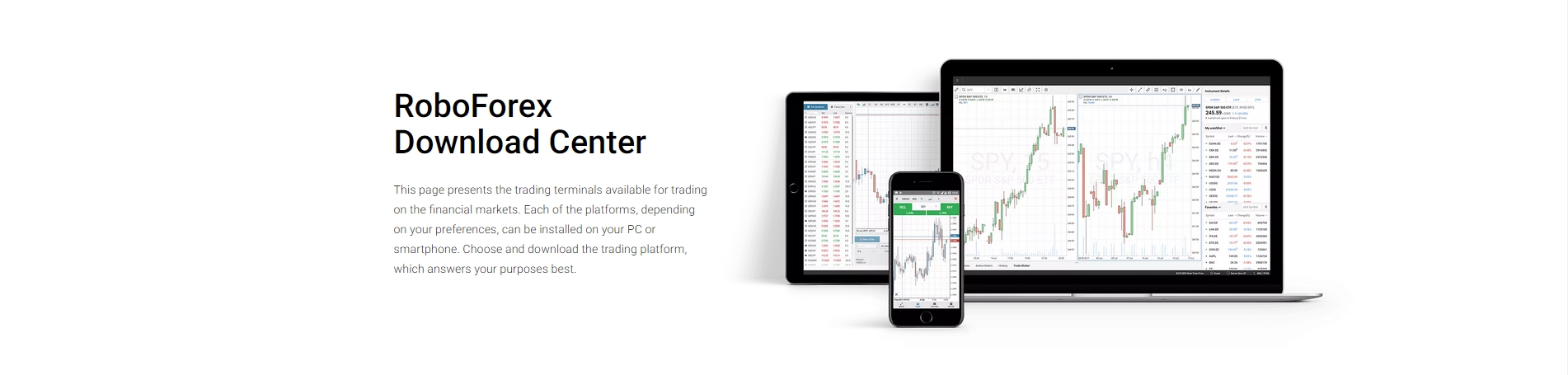
The Appeal of Mobile Trading
Mobile trading brings the markets to your fingertips, offering unparalleled convenience. You can monitor positions, check prices, and even execute trades from virtually anywhere. It’s perfect for those quick market checks during your commute or for staying connected when you’re away from your desk. * **Instant Access:** Open your app and instantly see market movements. * **On-the-Go Management:** Place, modify, or close trades quickly. * **Alerts and Notifications:** Stay informed about price changes and important events. While incredibly convenient, mobile platforms typically offer a streamlined interface, which can limit the depth of analysis. They are excellent for managing existing positions and reacting to immediate market shifts, but perhaps less suited for complex strategy development.Unleashing Power with Windows Desktop MT5
For serious traders who demand precision, advanced analysis, and powerful execution, nothing compares to the MetaTrader 5 desktop platform. When you download MT5 PC, you unlock a world of comprehensive tools designed for in-depth market exploration and automated trading. The RoboForex MetaTrader 5 Windows Download provides a stable, feature-rich environment built for performance.The MetaTrader 5 desktop version delivers:
- Advanced Charting: Access multiple chart types, timeframes, and customizable indicators for detailed technical analysis.
- Expert Advisors (EAs): Deploy automated trading strategies without interruption.
- Full Customization: Tailor your workspace with multiple monitors, profiles, and templates.
- Enhanced Order Types: Utilize a broader range of order types for precise entry and exit strategies.
- Depth of Market: See real-time market depth to gauge liquidity and sentiment.
Key Differences at a Glance
Let’s break down the core distinctions between these two powerful trading environments.| Feature | Mobile Trading (MT5 App) | Windows Desktop MT5 |
|---|---|---|
| Accessibility | High; any time, any place | Dedicated workspace; fixed location |
| Analytical Tools | Basic indicators, simple charting | Advanced charting, custom indicators, expert advisors |
| Automation | Not supported (monitoring only) | Full EA support, strategy backtesting |
| Customization | Limited interface options | Extensive layout, profiles, templates |
| Performance | Good for quick actions, alerts | High-performance, stable execution, minimal latency |
| Ideal For | Monitoring, quick trades, managing existing positions | In-depth analysis, strategy development, automated trading, full market overview |
When to Choose Which
Your choice often comes down to your immediate needs. Use mobile trading for convenience and quick checks when you are away from your main setup. It keeps you connected and allows for responsive actions. However, for deep dives into market data, strategy testing, and implementing complex automated systems, the MetaTrader 5 desktop is indispensable. To fully harness the analytical power and robust features, a dedicated MetaTrader 5 desktop setup is the way to go. Consider exploring the RoboForex MetaTrader 5 Windows Download to elevate your trading game.As one experienced trader puts it:
“Mobile is for keeping an eye on things, but the real work – the analysis, the strategy building, the automated trading – that happens on my MT5 Windows platform.”Ultimately, many successful traders use both, leveraging the strengths of each platform for a comprehensive trading experience. They rely on their MT5 for PC for serious analysis and strategic execution, while using their mobile app for on-the-go monitoring and rapid responses.
Security Measures in RoboForex MetaTrader 5
In the dynamic world of online trading, safeguarding your investments and personal data is paramount. When you decide on a RoboForex MetaTrader 5 Windows Download, you’re not just getting a powerful trading platform; you’re also accessing an environment built with robust security at its core. We understand that peace of mind is invaluable, which is why we prioritize comprehensive protection.
Protecting Your Data and Transactions
The MetaTrader 5 platform, a leading choice for millions of traders globally, inherently features advanced security protocols. This means that from the moment you access your account, your data is under vigilant protection. Here’s how:
- Strong Encryption: All data exchanged between your MetaTrader 5 desktop terminal and the RoboForex servers is secured with powerful encryption algorithms. This makes it incredibly difficult for unauthorized parties to intercept or decipher your sensitive information, including trade orders and account details.
- Secure Login: The login process itself is designed to resist brute-force attacks and unauthorized access. This layer of defense ensures only legitimate account holders can gain entry to their trading terminals.
- Data Integrity: MT5 ensures the integrity of your data, preventing any manipulation or alteration during transmission. You can trust that the information you see and act upon is accurate and untampered.
RoboForex’s Enhanced Security Framework
While the core MT5 Windows platform offers solid security, RoboForex implements additional measures to fortify your trading experience. We believe in going the extra mile to protect our clients.
When you download MT5 PC through RoboForex, you benefit from:
- Segregated Accounts: We hold client funds in segregated accounts at reputable European banks, completely separate from the company’s operational funds. This ensures your capital remains protected and accessible, even in unforeseen circumstances.
- Negative Balance Protection: Trade with confidence knowing you can’t lose more than your account balance. This essential safeguard prevents your account from going into negative territory due to market volatility.
- Regulatory Compliance: RoboForex adheres to strict regulatory standards, which includes rigorous financial reporting and operational transparency. This oversight adds another layer of accountability and protection for our clients.
- Secure Server Infrastructure: Our advanced server infrastructure is housed in secure data centers with multiple redundancies and constant monitoring. This minimizes downtime and protects against external threats, ensuring your MT5 for PC trading is always reliable and safe.
Choosing RoboForex means you are partnering with a broker that understands the critical importance of security. We continuously review and update our protocols to stay ahead of evolving threats, so you can focus on your trading strategies with complete confidence in the safety of your funds and data.
Troubleshooting Common MT5 Download Issues
Encountering a snag when trying to complete your RoboForex MetaTrader 5 Windows Download can be frustrating. We understand that getting your trading platform up and running smoothly is crucial. This guide tackles the most frequent download and installation challenges for MT5 Windows, providing clear, actionable solutions to get you trading faster.
Initial Checks Before You Begin
Before diving into complex troubleshooting, let’s cover a few fundamental checks. Often, the simplest solutions are the most effective when you’re looking to download MT5 PC.
- Internet Connection: Ensure your internet connection is stable. A flaky connection can interrupt the download process, leading to corrupted files. Try restarting your router or switching to a wired connection if possible.
- System Requirements: Verify that your PC meets the minimum system requirements for MetaTrader 5. While MT5 is lightweight, confirming compatibility avoids unnecessary headaches.
- Disk Space: Check that you have sufficient free disk space. The MetaTrader 5 desktop client requires a reasonable amount of space for installation and future data storage.
Addressing Specific Download & Installation Problems
Once you’ve covered the basics, let’s explore more specific issues you might face while trying to install MT5 for PC.
Antivirus and Firewall Interference
Your security software is designed to protect you, but sometimes it can be a bit overzealous, blocking legitimate downloads or installations. This is a common culprit for failed RoboForex MetaTrader 5 Windows Download attempts.
- Solution: Temporarily disable your antivirus software and firewall. Attempt the download and installation again. Remember to re-enable them immediately after the installation is complete to maintain your system’s security. You might also add the MT5 installer and its installation directory to your security software’s exclusion list.
Corrupted Download File
An interrupted internet connection or server hiccup can result in a partially downloaded or corrupted installation file. This means the file your system receives isn’t complete or correct, preventing proper installation.
- Solution: Delete any previously downloaded MT5 installer files from your “Downloads” folder. Clear your browser’s cache and cookies. Then, attempt the download MT5 PC process again from the official RoboForex website.
Installation Errors (Run as Administrator)
Sometimes, the installer might lack the necessary permissions to write files to certain system directories, leading to an installation failure.
- Solution: Locate the downloaded MT5 installer file. Right-click on it and select “Run as administrator.” This grants the installer the elevated permissions it needs to complete the process smoothly.
Outdated Graphics Drivers
While less common for the initial download, outdated graphics drivers can cause display issues once MetaTrader 5 desktop is installed, or even prevent the installer from launching correctly.
- Solution: Update your graphics card drivers to the latest version. Visit your graphics card manufacturer’s website (NVIDIA, AMD, Intel) to find the appropriate drivers for your system.
When to Seek Professional Support
If you’ve diligently followed these troubleshooting steps and still can’t complete your RoboForex MetaTrader 5 Windows Download or get MT5 Windows to install properly, it’s time to reach out for assistance. Provide them with detailed information about the issue, including any error messages you receive, and the steps you’ve already taken. This helps their support team diagnose the problem more efficiently and get your MT5 for PC experience started without further delay.
Maximizing Your Trading Potential with RoboForex
Every successful trader knows the secret: powerful tools make all the difference. At RoboForex, we provide exactly that, empowering you to navigate the financial markets with confidence and precision. We combine competitive trading conditions with a world-class platform, setting the stage for your trading aspirations to flourish. Our commitment is to offer a transparent and efficient environment where your potential can truly be maximized.Your Gateway to Advanced Trading: RoboForex and MetaTrader 5
Choosing the right platform is critical. That is why RoboForex proudly offers MetaTrader 5, a leading multi-asset platform designed for serious traders. MT5 provides an unparalleled suite of analytical tools and trading functions, making it the preferred choice for those seeking depth and capability. Whether you are executing complex strategies or relying on automated trading, MetaTrader 5 delivers.Get Started: The RoboForex MetaTrader 5 Windows Download
Ready to take control of your trading future? Your journey begins with a straightforward **RoboForex MetaTrader 5 WIndows Download**. Installing the platform is quick and easy, giving you immediate access to global financial markets directly from your personal computer. The dedicated **MT5 Windows** application ensures stability and performance, tailored for your desktop experience. This isn’t just a web interface; it’s a robust **MetaTrader 5 desktop** application engineered for speed and reliability. When you **download MT5 PC**, you gain a powerful ally in your trading endeavors.Why Choose MT5 for PC on RoboForex?
The **MT5 for PC** offers a comprehensive environment packed with features designed to give you an edge. Here’s what you can expect:- Advanced Charting Tools: Utilize dozens of analytical objects and indicators to analyze price movements with precision.
- Multiple Timeframes: Study market dynamics across 21 different timeframes, from minute charts to yearly views.
- Depth of Market (DOM): Gain insight into market liquidity and order flow with real-time bid and ask prices.
- Economic Calendar: Stay informed with integrated economic news and events directly within the platform.
- Algorithmic Trading: Develop and deploy expert advisors (EAs) to automate your strategies and trade around the clock.
- Multi-Asset Trading: Access a broad range of instruments, including Forex, stocks, indices, and commodities, all from a single terminal.
Seamless Integration, Superior Performance
RoboForex optimizes your MetaTrader 5 experience. Our infrastructure ensures fast execution speeds and reliable connectivity, so your trades are always processed efficiently. This dedication to performance means you can focus entirely on your strategy, knowing your platform will keep up.| Feature | Benefit to You |
|---|---|
| Robust Architecture | Reliable, uninterrupted trading |
| Advanced Tools | In-depth market analysis and decision making |
| Automated Trading | Execute strategies 24/7 without constant monitoring |
| Multi-Asset Access | Diversify your portfolio easily |
RoboForex MetaTrader 5: A Professional Trader’s Choice
Serious traders demand serious tools. When it comes to advanced market analysis and seamless execution, the RoboForex MetaTrader 5 Windows Download stands out as the ultimate platform. It’s not just a trading terminal; it’s a comprehensive ecosystem designed for strategic insights and superior performance on financial markets.
Unleashing Advanced Trading Power
The MetaTrader 5 desktop version provides an unparalleled trading experience. It combines a user-friendly interface with powerful analytical capabilities, giving you the edge you need. You gain access to a broad spectrum of financial instruments, from forex and stocks to commodities and cryptocurrencies, all within a single robust platform.
Key Advantages for Traders:
- Superior Charting Tools: Explore 21 timeframes and an unlimited number of charts. Access advanced technical indicators and analytical objects to pinpoint market trends with precision.
- Enhanced Order Management: Experience diverse order types and execution modes, giving you full control over your trading strategies.
- Algorithmic Trading: Build, test, and run your Expert Advisors (EAs) using the integrated MQL5 development environment. Automate your strategies with confidence.
- Fundamental Analysis: Stay informed with an integrated economic calendar, news feed, and market depth information, helping you make data-driven decisions.
- Secure and Reliable: Benefit from robust security protocols and stable performance, ensuring your trades and data remain protected.
Why Choose RoboForex for Your MT5 Experience?
Partnering with RoboForex for your MetaTrader 5 journey enhances your trading potential. We commit to providing optimal trading conditions, ensuring a smooth and efficient experience with the platform.
| Benefit | Description |
|---|---|
| Competitive Spreads | Access tight spreads on a wide array of instruments, reducing your trading costs. |
| Fast Execution | Benefit from rapid order execution, crucial for capitalizing on fleeting market opportunities. |
| Dedicated Support | Receive professional, multilingual support whenever you need assistance. |
Seamless Access: Download MT5 PC Today
Getting started with the power of MT5 Windows is straightforward. You can easily download MT5 PC directly from our website. The installation process is quick and simple, designed to get you trading without delay. Take control of your financial future and elevate your trading strategy with the industry-leading MetaTrader 5 for PC. It’s the smart choice for any serious trader aiming for consistent results.
Frequently Asked Questions
What is RoboForex MetaTrader 5 Windows Download?
The RoboForex MetaTrader 5 Windows Download provides a dedicated desktop application for traders to access financial markets through their RoboForex account. It’s a comprehensive ecosystem designed for serious traders, offering unparalleled market access, analytical depth, stability, speed, and a robust, intuitive interface right on your desktop. It allows trading across Forex, Stocks, Indices, Commodities, and Cryptocurrencies with advanced charting, algorithmic trading, and flexible order management.
How do I download and install MT5 for PC from RoboForex?
To download and install MT5 for PC, first visit the official RoboForex website and navigate to the MetaTrader 5 section. Locate and click the “Download MetaTrader 5 for Windows” button. Once the installer file (e.g., `robofxmt5setup.exe`) is downloaded, double-click it, accept the license agreement, and follow the on-screen prompts to complete the installation. After setup, launch the application, select the appropriate RoboForex server, and log in with your account credentials.
What are the key advantages of using MetaTrader 5 on Windows?
MetaTrader 5 on Windows offers several distinct advantages, including enhanced performance and stability, ensuring rapid order execution and stable operation even during high volatility. It provides an advanced analytical toolkit with 21 timeframes, 38+ indicators, and Depth of Market (DOM) functionality. Powerful algorithmic trading through Expert Advisors (EAs) and multi-asset trading capabilities across Forex, Stocks, Commodities, and Indices are also core benefits. Furthermore, it offers unparalleled customization for a personalized user experience.
What trading instruments are available on RoboForex MT5?
The RoboForex MT5 platform provides access to a diverse range of financial instruments. These include Forex (major, minor, and exotic currency pairs), Stocks & ETFs (equities from global exchanges and diversified funds), Indices (CFDs on major global market indices), Commodities (precious metals like gold, energy products like oil, and agricultural goods), and Cryptocurrencies (CFDs on popular digital assets like Bitcoin and Ethereum).
How does RoboForex MetaTrader 5 ensure security for traders?
Security in RoboForex MetaTrader 5 is built on robust foundations. All data exchanged between your terminal and RoboForex servers is protected with strong encryption algorithms. The login process is secure, and data integrity is maintained to prevent manipulation. Additionally, RoboForex implements segregated client accounts, offers negative balance protection, adheres to strict regulatory compliance, and uses a secure server infrastructure to safeguard funds and personal data.